> ## Documentation Index
> Fetch the complete documentation index at: https://bunny.net/docs/llms.txt
> Use this file to discover all available pages before exploring further.
# Agent Readability
> Serve clean Markdown and an llms.txt file to help AI agents understand and navigate your website
Agent Readability makes the content behind your Pull Zone easier for AI agents to consume. It can convert HTML pages into clean, token-efficient Markdown on demand and generate an `llms.txt` file that describes your website and points agents to its most useful pages.
Human visitors continue to receive your regular website. Markdown is returned only when explicitly requested, either through the `Accept` header or a Markdown representation URL.
## How Agent Readability works
Agent Readability provides two related capabilities:
* **Markdown for AI agents** converts an HTML page into a content-focused Markdown representation. It removes presentation markup and common boilerplate while preserving useful content such as headings, paragraphs, lists, links, images, code blocks, and tables.
* **Generated `llms.txt`** creates a Markdown index containing a short description of your website and links to important pages, grouped into relevant sections. You choose whether Agent Readability discovers those pages automatically, uses a list you provide, or selects them from a sitemap.
Generating and serving `llms.txt` requires **Markdown for AI agents** to be
enabled. Both features require Bunny Optimizer to be enabled on the Pull
Zone.
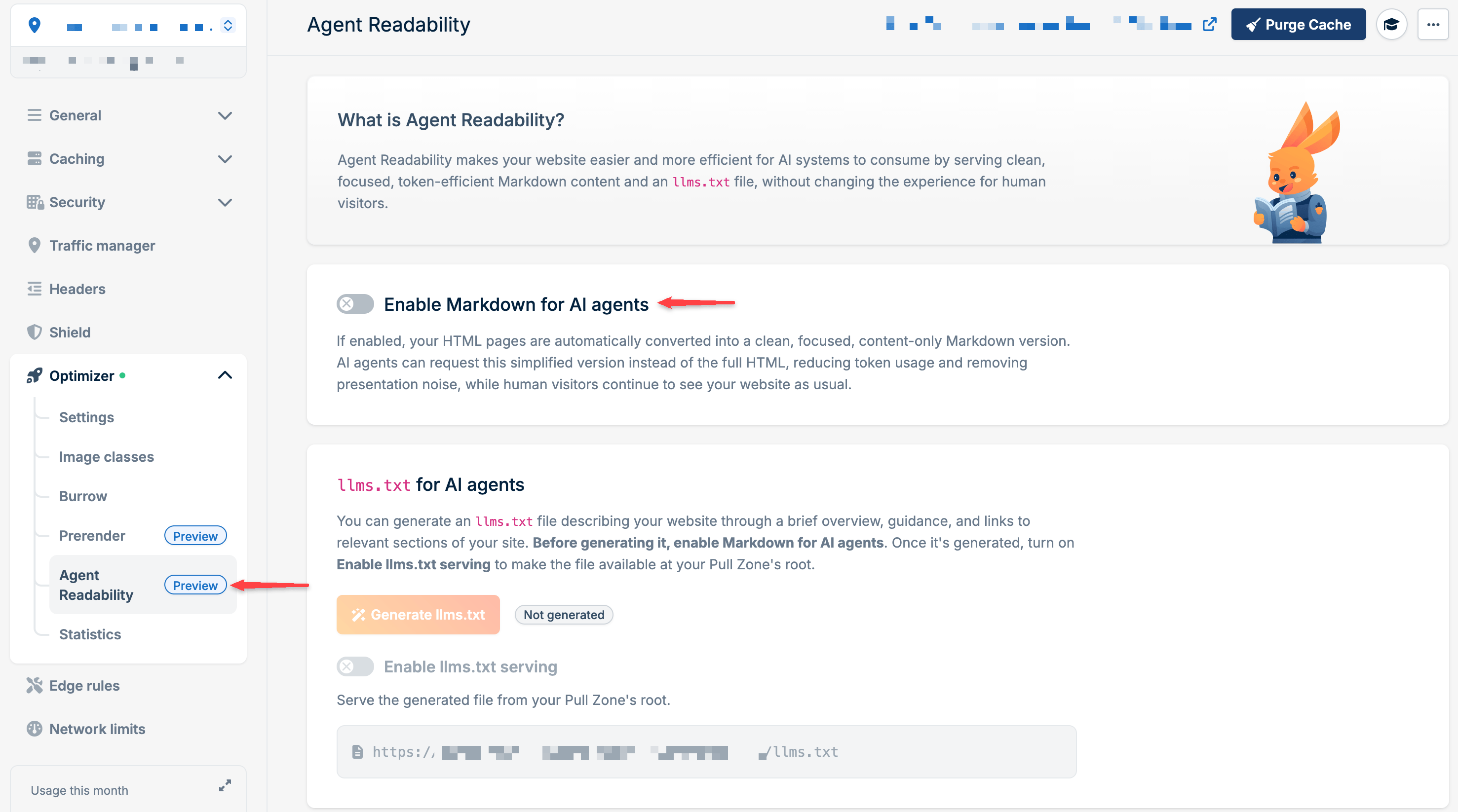
## Enable Markdown for AI agents
1. Open your **Pull Zone** in the bunny.net dashboard.
2. Select **Optimizer**
3. Enable Bunny Optimizer if it is not already enabled.
4. Select **Optimizer** → **Agent Readability**.
5. Turn on **Enable Markdown for AI agents**.
 The same page can now be requested as either HTML or Markdown. To request Markdown, send `text/markdown` in the `Accept` header:
```bash theme={null}
curl --header "Accept: text/markdown" https://.b-cdn.net/docs/getting-started
```
A request without the Markdown Accept header continues to receive the original HTML page. Browsers do not request text/markdown by default.
### Markdown representation URLs
Alternatively, you can request a Markdown representation directly through a URL instead of using the Accept header. The URL format depends on whether the original path ends with a slash:
| Original page | Markdown representation |
| ------------------------------------ | --------------------------------------------- |
| `https://.b-cdn.net/docs/` | `https://.b-cdn.net/docs/index.md` |
| `https://.b-cdn.net/about` | `https://.b-cdn.net/about.index.md` |
The representation keeps the original page URL as its base, so relative links and images become absolute URLs that continue to point through your Pull Zone.
### What gets converted
Agent Readability converts HTML documents and keeps their readable content. During conversion, it:
* Preserves headings, paragraphs, lists, links, images, code blocks, blockquotes, task lists, strikethrough text, and tables
* Removes navigation, footers, sidebars, forms, dialogs, search controls, scripts, styles, and embedded media
* Removes hidden and `aria-hidden` content
* Resolves relative links and image sources against the public Pull Zone URL
If a response cannot be converted, for example, because it is not HTML, is too large, or conversion fails, Agent Readability returns the original response instead of replacing it with incomplete Markdown.
## Generate an llms.txt file
An `llms.txt` file is a Markdown index at the root of your website. It gives AI agents a concise overview of the site and links them to representative content without requiring them to discover every page themselves.
To generate it:
1. Open **Optimizer** → **Agent Readability** and enable **Markdown for AI agents**.
2. Click **Generate llms.txt**.
3. Choose a generation mode and provide any requested source information.
4. Click **Generate llms.txt** in the dialog.
5. Wait for the status to change from **Processing** to **Generated**. Click **Refresh** to check the latest status.
6. Turn on **Enable llms.txt serving**.
The generated file is served from the root of the Pull Zone hostname shown in the dashboard:
```text theme={null}
https://.b-cdn.net/llms.txt
```
Generating the file does not publish it automatically. It becomes publicly available only after generation succeeds and **Enable llms.txt serving** is turned on.
### Generation modes
Agent Readability can select up to 20 source pages for one `llms.txt` generation.
Agent Readability discovers representative pages for you. It considers pages
that have already been successfully converted to Markdown and looks for a
sitemap declared in `robots.txt`. If `robots.txt` does not declare one, it
tries `/sitemap.xml`.
This mode works best after Markdown representations of some pages have
already been requested or when your site publishes a sitemap.
Enter up to 20 absolute HTTP or HTTPS URLs that best describe your website,
such as its homepage, product pages, documentation, and pricing page. The
dialog may prefill URLs for pages that Agent Readability has already converted to
Markdown. You can edit or remove them before starting generation.
Enter the absolute URL of a sitemap. The field defaults to
`https://.b-cdn.net/sitemap.xml` for the selected Pull Zone hostname.
Agent Readability reads the sitemap and selects the most representative pages.
Sitemap indexes are supported. Agent Readability reads one level of the index and
processes up to 10 child sitemaps.
For all modes, the selected pages must be reachable publicly and must return usable Markdown when requested with `Accept: text/markdown`.
Pages that cannot be fetched or converted are skipped.
If no valid pages are provided, the generation fails.
## Regenerate llms.txt
Regenerate the file if generation fails or when the structure or primary content of your website changes:
1. Open **Optimizer** → **Agent Readability**.
2. Click **Regenerate llms.txt**.
3. Choose a generation mode and start generation.
4. Wait for the status to return to **Generated**.
Generating llms.txt requires significant processing, so regeneration is rate limited.
The waiting period is determined by the system and can range from 5 minutes to 24 hours.
The dashboard shows when regeneration becomes available again.
## Troubleshooting
### A Markdown request returns HTML
Check that:
* Bunny Optimizer and **Markdown for AI agents** are enabled.
* The request method is `GET` or `HEAD`.
* The `Accept` header contains `text/markdown`, or you are using a valid Markdown representation URL.
* The requested resource returns HTML. Static assets and formats such as images, PDFs, JSON, XML, and existing Markdown files are not converted.
Agent Readability also falls back to the original response when the HTML response is larger than 4 MB or cannot be converted.
If HTML Prerender is enabled, it takes precedence when a recognized crawler requests the original page URL. Use the Markdown representation URL when that crawler specifically needs Markdown.
### llms.txt generation fails
Confirm that the source URLs:
* Are absolute `http://` or `https://` URLs
* Are publicly reachable without credentials
* Return successful HTML responses through the Pull Zone
* Can be returned as `text/markdown` when requested
For **Automatic** mode, make sure the Pull Zone has previously served some Markdown pages or exposes a sitemap. For **Use sitemap**, verify that the sitemap URL and any child sitemaps are publicly reachable.
If generation fails, wait until the retry time shown in the dashboard and try again.
### llms.txt is not available at the site root
The file is served only when its status is **Generated** and **Enable llms.txt serving** is on. Verify both settings, then request `/llms.txt` from the Pull Zone hostname shown in the dashboard.
The same page can now be requested as either HTML or Markdown. To request Markdown, send `text/markdown` in the `Accept` header:
```bash theme={null}
curl --header "Accept: text/markdown" https://.b-cdn.net/docs/getting-started
```
A request without the Markdown Accept header continues to receive the original HTML page. Browsers do not request text/markdown by default.
### Markdown representation URLs
Alternatively, you can request a Markdown representation directly through a URL instead of using the Accept header. The URL format depends on whether the original path ends with a slash:
| Original page | Markdown representation |
| ------------------------------------ | --------------------------------------------- |
| `https://.b-cdn.net/docs/` | `https://.b-cdn.net/docs/index.md` |
| `https://.b-cdn.net/about` | `https://.b-cdn.net/about.index.md` |
The representation keeps the original page URL as its base, so relative links and images become absolute URLs that continue to point through your Pull Zone.
### What gets converted
Agent Readability converts HTML documents and keeps their readable content. During conversion, it:
* Preserves headings, paragraphs, lists, links, images, code blocks, blockquotes, task lists, strikethrough text, and tables
* Removes navigation, footers, sidebars, forms, dialogs, search controls, scripts, styles, and embedded media
* Removes hidden and `aria-hidden` content
* Resolves relative links and image sources against the public Pull Zone URL
If a response cannot be converted, for example, because it is not HTML, is too large, or conversion fails, Agent Readability returns the original response instead of replacing it with incomplete Markdown.
## Generate an llms.txt file
An `llms.txt` file is a Markdown index at the root of your website. It gives AI agents a concise overview of the site and links them to representative content without requiring them to discover every page themselves.
To generate it:
1. Open **Optimizer** → **Agent Readability** and enable **Markdown for AI agents**.
2. Click **Generate llms.txt**.
3. Choose a generation mode and provide any requested source information.
4. Click **Generate llms.txt** in the dialog.
5. Wait for the status to change from **Processing** to **Generated**. Click **Refresh** to check the latest status.
6. Turn on **Enable llms.txt serving**.
The generated file is served from the root of the Pull Zone hostname shown in the dashboard:
```text theme={null}
https://.b-cdn.net/llms.txt
```
Generating the file does not publish it automatically. It becomes publicly available only after generation succeeds and **Enable llms.txt serving** is turned on.
### Generation modes
Agent Readability can select up to 20 source pages for one `llms.txt` generation.
Agent Readability discovers representative pages for you. It considers pages
that have already been successfully converted to Markdown and looks for a
sitemap declared in `robots.txt`. If `robots.txt` does not declare one, it
tries `/sitemap.xml`.
This mode works best after Markdown representations of some pages have
already been requested or when your site publishes a sitemap.
Enter up to 20 absolute HTTP or HTTPS URLs that best describe your website,
such as its homepage, product pages, documentation, and pricing page. The
dialog may prefill URLs for pages that Agent Readability has already converted to
Markdown. You can edit or remove them before starting generation.
Enter the absolute URL of a sitemap. The field defaults to
`https://.b-cdn.net/sitemap.xml` for the selected Pull Zone hostname.
Agent Readability reads the sitemap and selects the most representative pages.
Sitemap indexes are supported. Agent Readability reads one level of the index and
processes up to 10 child sitemaps.
For all modes, the selected pages must be reachable publicly and must return usable Markdown when requested with `Accept: text/markdown`.
Pages that cannot be fetched or converted are skipped.
If no valid pages are provided, the generation fails.
## Regenerate llms.txt
Regenerate the file if generation fails or when the structure or primary content of your website changes:
1. Open **Optimizer** → **Agent Readability**.
2. Click **Regenerate llms.txt**.
3. Choose a generation mode and start generation.
4. Wait for the status to return to **Generated**.
Generating llms.txt requires significant processing, so regeneration is rate limited.
The waiting period is determined by the system and can range from 5 minutes to 24 hours.
The dashboard shows when regeneration becomes available again.
## Troubleshooting
### A Markdown request returns HTML
Check that:
* Bunny Optimizer and **Markdown for AI agents** are enabled.
* The request method is `GET` or `HEAD`.
* The `Accept` header contains `text/markdown`, or you are using a valid Markdown representation URL.
* The requested resource returns HTML. Static assets and formats such as images, PDFs, JSON, XML, and existing Markdown files are not converted.
Agent Readability also falls back to the original response when the HTML response is larger than 4 MB or cannot be converted.
If HTML Prerender is enabled, it takes precedence when a recognized crawler requests the original page URL. Use the Markdown representation URL when that crawler specifically needs Markdown.
### llms.txt generation fails
Confirm that the source URLs:
* Are absolute `http://` or `https://` URLs
* Are publicly reachable without credentials
* Return successful HTML responses through the Pull Zone
* Can be returned as `text/markdown` when requested
For **Automatic** mode, make sure the Pull Zone has previously served some Markdown pages or exposes a sitemap. For **Use sitemap**, verify that the sitemap URL and any child sitemaps are publicly reachable.
If generation fails, wait until the retry time shown in the dashboard and try again.
### llms.txt is not available at the site root
The file is served only when its status is **Generated** and **Enable llms.txt serving** is on. Verify both settings, then request `/llms.txt` from the Pull Zone hostname shown in the dashboard.