

How replication works
Every database has one primary that accepts all writes, and any number of replicas that serve reads.- A read is normally served by the replica you connect to, from its local copy of the data. Nothing leaves the region, so it is fast.
- A write is always forwarded to the primary, wherever you send it. The primary commits it, assigns it a position in the write-ahead log, and streams it to the replicas, which apply it in order.
Reads inside a transaction go to the primary. Once you open an explicit
transaction with
BEGIN, every statement on that connection, including plain
SELECT statements, is forwarded to the primary until the transaction ends.
This is slower, but it keeps the transaction’s view of the data consistent.Regions
Configure regions from the Dashboard or the Bunny CLI:- Dashboard
- CLI
Manage regions from Dashboard > Edge Platform > Database > [Select Database] > Regions.
Storage location
Data can be stored at rest in:- Toronto, CA (North America)
- Frankfurt, DE (Europe)

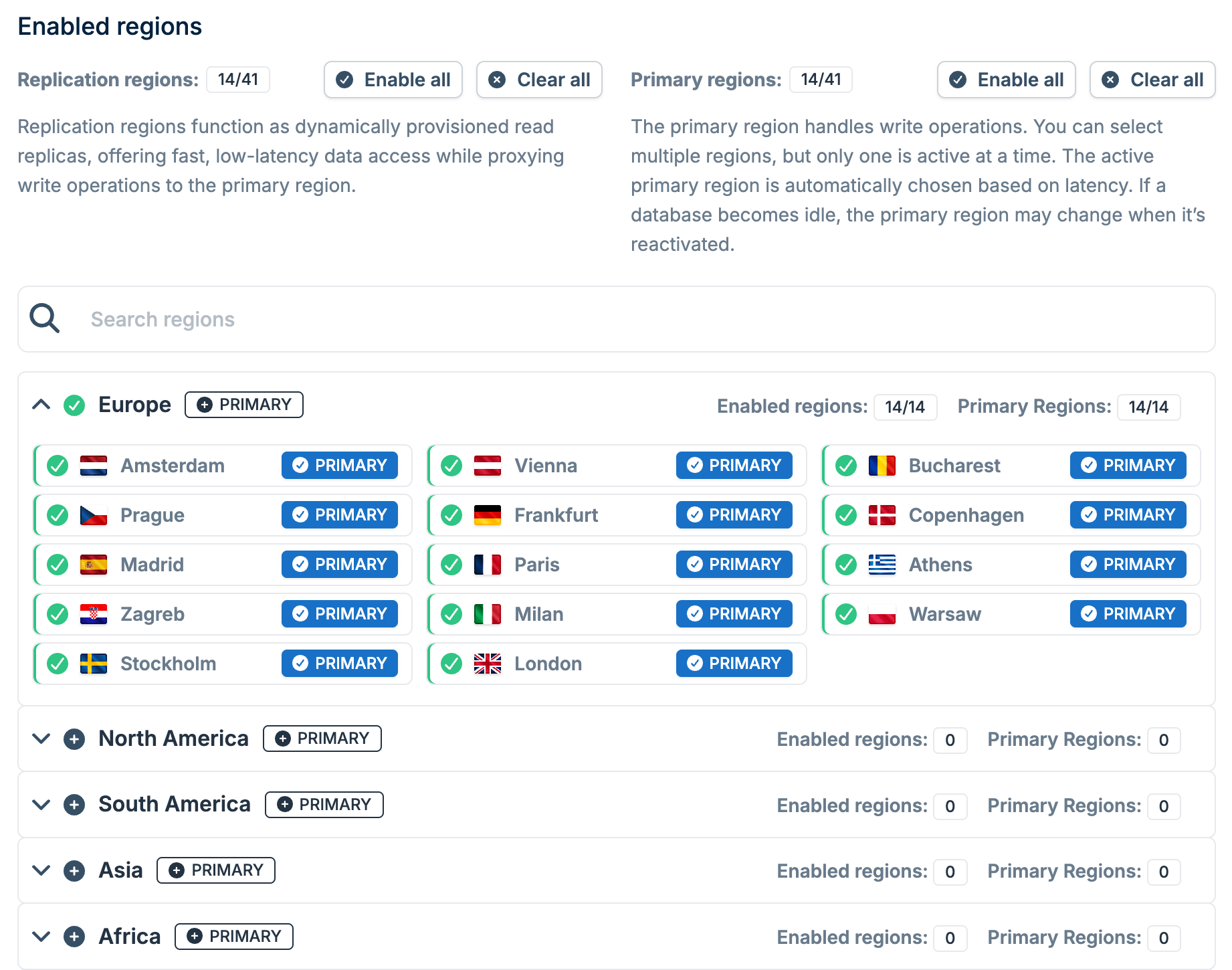
Enabled regions
What is guaranteed
Transactions are serializable. A transaction sees a frozen view of the database and is fully isolated from other transactions in flight, on the primary and on replicas alike. A connection always sees its own writes. If you write and then read on the same connection, the read observes that write. The database does this by making the read wait until the replica has caught up to your write, so you get a short delay rather than a stale answer. Reads on a replica move forward, never backward. Once a connection has observed a value, later reads on that replica return that value or a newer one. They do not revert to an older state.What is not guaranteed
Two different connections may see different points in time. The own-writes guarantee covers one connection. It says nothing about a second connection, and nothing at all about a connection from a different instance of your application. This is the case that surprises people, so it is worth stating plainly: There is no global ordering between instances. Two instances need not be in sync at any moment, and neither is “ahead” of the other in any way you can rely on. This is a property of asynchronous replication, not a defect, and it is the normal trade-off for serving reads locally. When your application needs the stronger guarantee, use the replication index described below.Read-after-write across instances
To guarantee that a read observes a specific earlier write, pass a replication index along with the read. The replication index is the position of that write in the log. The replica waits until it has applied at least that position before answering. This is a wait, not a reroute. The read is still served locally, it just does not answer early.1
Read the index from the write's response
Every statement result returned by the SQL API carries a
replication_index field. After a write, it holds the position of that commit:The value is a JSON string, not a number, because a log position can
exceed what JSON integers represent safely. Keep it as a string or parse it
into a 64-bit integer. Do not put it through a 32-bit or floating-point type.
2
Carry the index to wherever the read happens
Store it wherever your application already passes state between requests and instances: a session record, a cookie, a claim in an auth token, or a cache entry.This step is yours to build, because only your application knows which reads depend on which writes. A load balancer cannot work it out.
3
Pass the index with the read
Send it as The replica blocks until it has applied position 42, then runs the query. The result is guaranteed to include the write that produced that index.You can send the value as a string or as a number. Responses always use a string.
replication_index on the statement:Worked example
Consider revoking a user’s access, where the revocation must be visible immediately on every instance:- Instance A runs
DELETE FROM course_access WHERE user_id = 'u_123'and gets backreplication_index: "42". - Instance A writes
42into the user’s session record. - Instance B handles the user’s next request, reads
42from the session, and sends its access check withreplication_index: "42". - Instance B’s replica waits until it has applied position 42, then runs the check. The revocation is visible.
When to use it
Passing an index makes a read wait, so it trades latency for certainty. The delay is however far behind the replica happens to be at that moment. Use it for reads where stale data is actually harmful:- Permission and access checks after a change
- Reading back a record straight after creating it, on a different instance
- Showing a user the result of an action they just took
- Listings, search results, feeds
- Analytics and dashboards
- Any read that does not depend on a recent write
Client support
Thereplication_index field is part of the SQL API, and you can set it from any client that lets you build requests yourself.
Support for setting replication_index on reads varies between the libSQL SDKs, and some do not expose the field. If yours does not, send those specific queries through the SQL API directly and keep using the SDK for everything else.
Troubleshooting
Two requests return different results for the same query
Two requests return different results for the same query
The two requests were most likely served by different connections, and possibly by replicas in different regions. Each replica answers from its own copy of the data, and nothing guarantees that two replicas are at the same position at the same moment.If the second request must see what the first one wrote, pass the write’s
replication_index with the read as described in Read-after-write across instances.A read still returns old data long after the write
A read still returns old data long after the write
Replication lag is normally short, so a read that returns hours-old data is usually not waiting on replication. Check these causes first:
- An open transaction. A transaction sees a frozen view of the database from the moment it starts. A connection that has kept a transaction open for a long time keeps returning that old view until the transaction ends.
- A cache in front of the database. An application cache, an HTTP cache, or an ORM identity map can return the earlier answer without ever querying the database.
- A different database. Confirm both requests use the same database URL, for example that one environment is not pointing at a staging copy.
replication_index. If it returns the new data promptly, the replica had already caught up and the stale answer came from somewhere else. If the read blocks for a long time instead, the replica genuinely has not applied that position. That is not expected. Contact support with the database ID, the region, and the replication index.Why is a read replica eventually consistent?
Why is a read replica eventually consistent?
Replicas receive changes from the primary asynchronously. The primary confirms a write as soon as it is committed locally, without waiting for every replica to apply it. This keeps writes fast and lets each region serve reads without a round trip to the primary, at the cost that a replica can briefly answer from a slightly older state.Within one connection the database hides this from you by making reads wait for that connection’s own writes. Across connections and instances, you decide which reads must wait, by passing a
replication_index.