

Burrow is a usage-based feature, not included in the Optimizer base fee. See Burrow pricing for details.
How to enable Burrow
- Open your Pull Zone settings
- Navigate to Optimizer
- Enable Bunny Optimizer if not already enabled
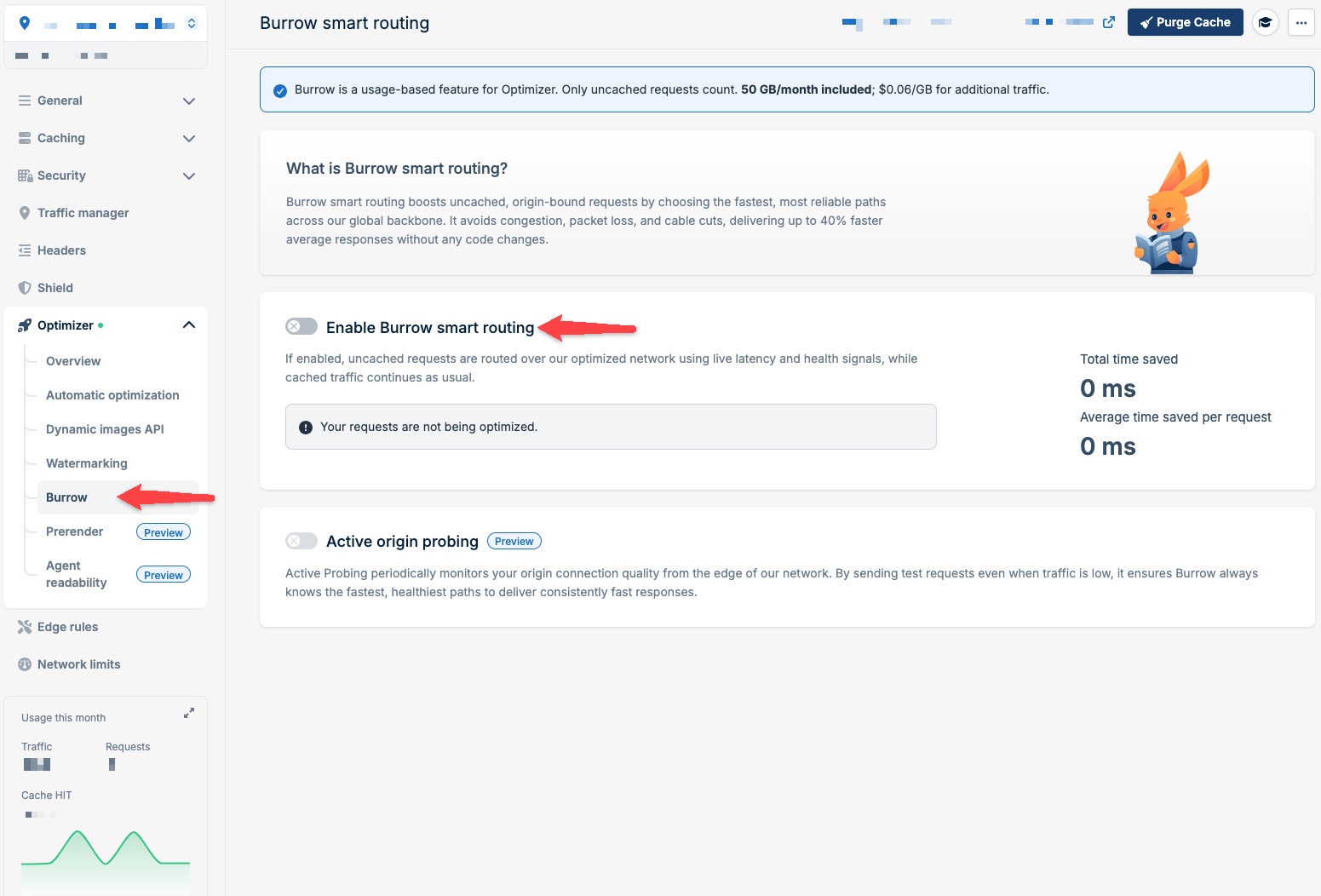
- Open the Burrow tab and click Enable Burrow smart routing
If Origin Shield is enabled on the same Pull Zone, uncached requests are routed through the selected Origin Shield location and are not affected by Burrow smart routing.
Burrow smart routing is supported only on Pull Zones with a single origin hosted outside the bunny.net network. It is not applied to Pull Zones that use a Bunny Storage Zone origin, a load balancer origin, Perma-Cache, or Standalone Edge Scripts.
How Burrow works
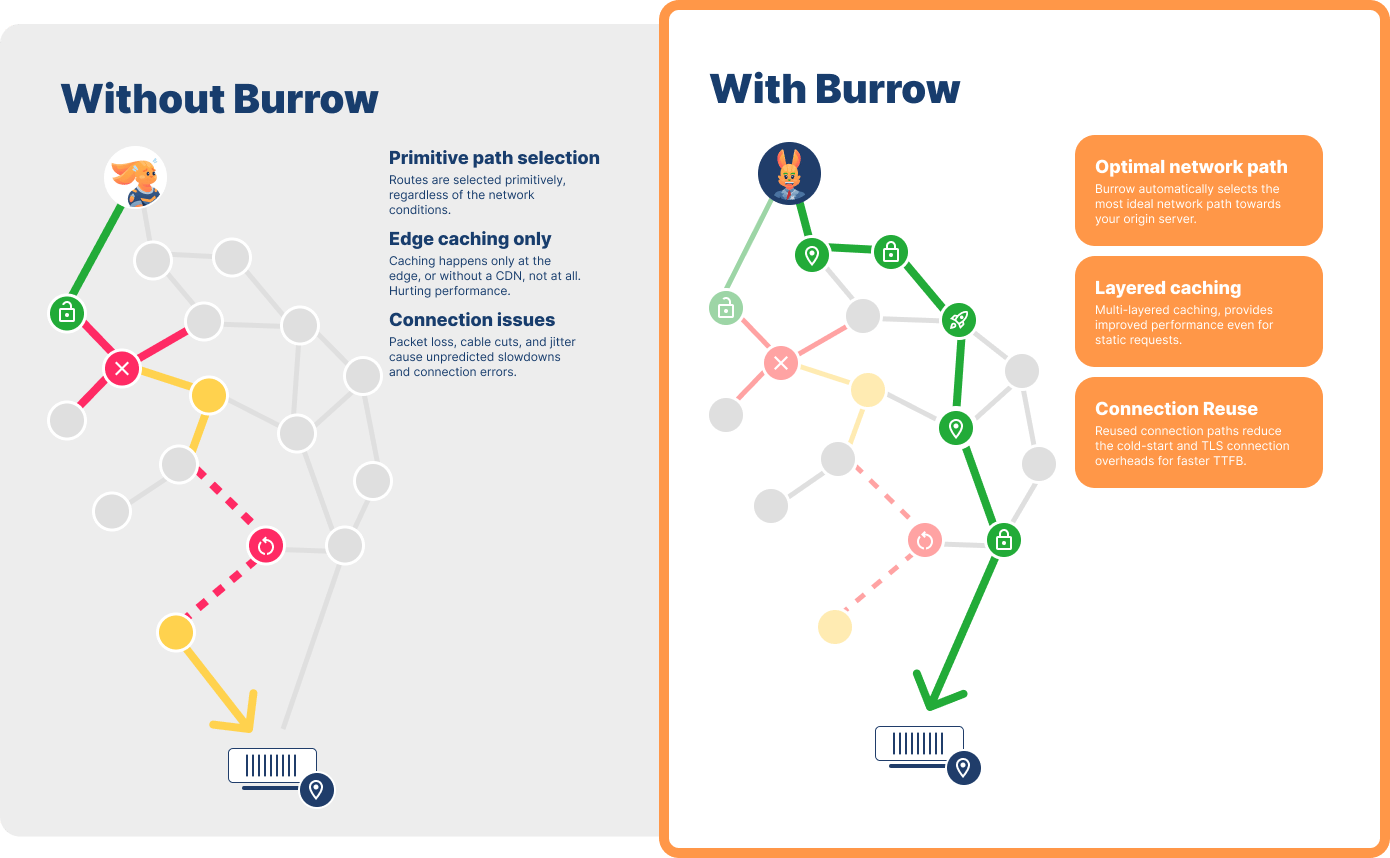
Burrow is an always-on, self-optimizing routing engine built into the bunny.net network infrastructure. When a request isn’t in cache, Burrow:- Monitors global network conditions across 119 datacenters in 77 countries
- Analyzes real-time latency and health signals
- Selects the optimal path to your origin for each request
- Routes traffic around congestion, packet loss, outages, and cable cuts
- Optimizes TLS connections by reusing pre-secured connections instead of performing slow handshakes from distant locations
Benefits
Faster response times: Lower TTFB and up to 40% improvement in average response times for uncached requests. Network resilience: Automatic routing around outages, packet loss, and congestion across the global internet. Optimized connections: Pre-secured, reused TLS connections reduce handshake overhead and connection errors. Better caching: Improved connection reliability means more consistent cache population. Self-optimizing: Learns from real global traffic patterns to continuously improve path selection. No configuration required: Works automatically with no code changes or migrations needed. Burrow is particularly beneficial for API traffic, real-time applications, personalized content, e-commerce transactions, and SaaS applications where users are geographically distributed or far from your origin server.Active origin probing
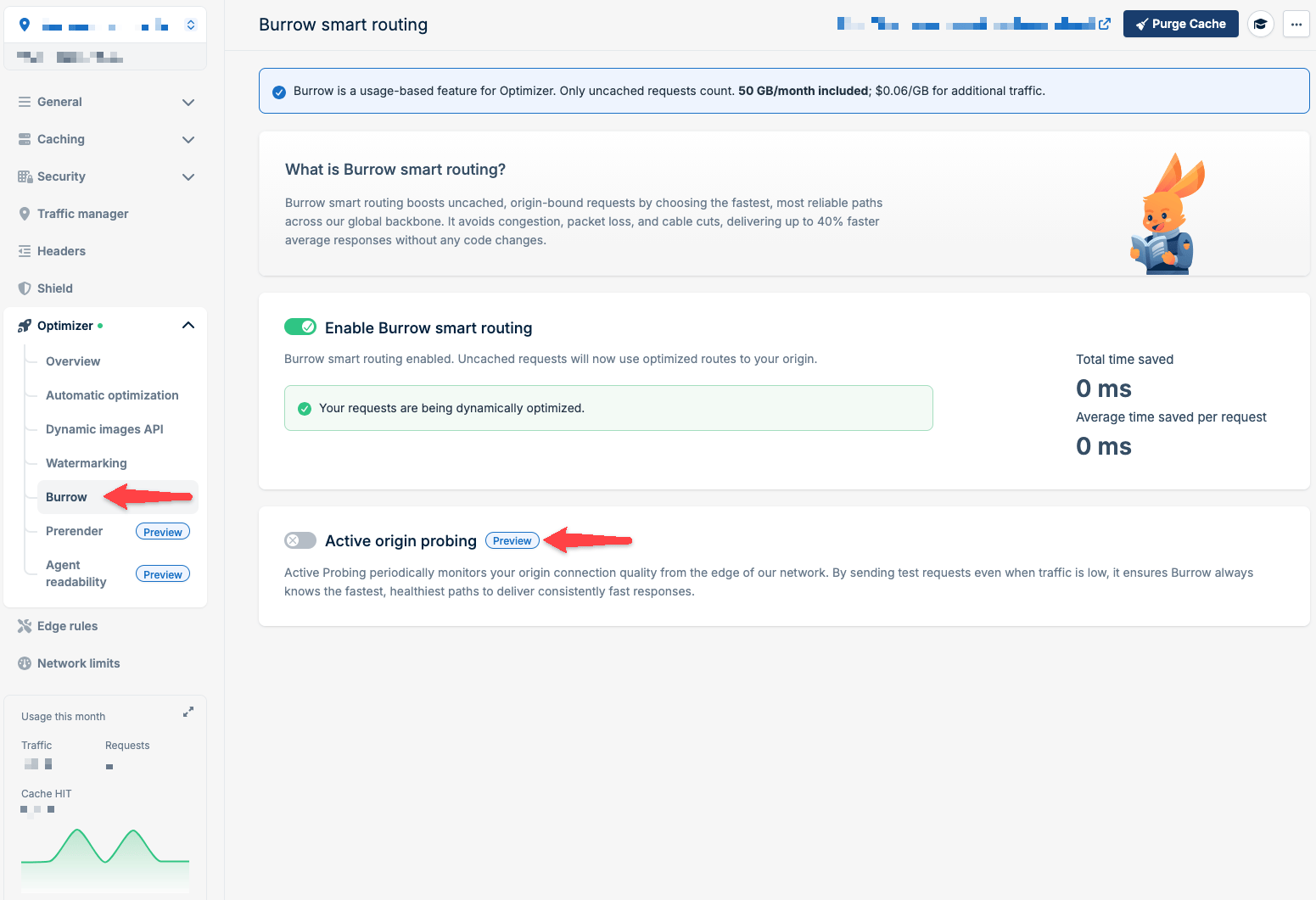
Preview Active origin probing periodically tests origin connection quality from edge locations with lightweight checks. This allows Burrow to map optimal paths ahead of time, ensuring the routing engine is always prepared with up-to-date network information, even during low-traffic periods. This feature is particularly beneficial for smaller projects that don’t generate enough traffic volume for Burrow to learn patterns organically. Unlike Burrow smart routing, which needs no changes on your side once enabled, active origin probing requires serving a probe file from your origin.How to enable Active origin probing
- Open your Pull Zone settings
- Navigate to Optimizer
- Enable Bunny Optimizer and Burrow smart routing if not already enabled
- Click Active origin probing to open the configuration window
- Download the Probe File and configure your origin to serve it at
/.well-known/bunny-burrow-probe.txt. The file must be publicly available - Test that the file is reachable
- Once the file is reachable, click Enable Active Probing
How Active origin probing works
Burrow probes your origin only when your Pull Zone receives traffic. When a request arrives, Burrow checks whether it has recent routing data for the origin. If it doesn’t, it starts sending probes from bunny.net’s edge network. If a Pull Zone receives no traffic anywhere in the world, Burrow sends no probes, because there is nothing to optimize and Burrow is designed to keep extra traffic to your origin to a minimum. Probes are lightweight and infrequent, but the probe frequency may change, so don’t rely on a specific rate. Probes are sent with theUser-Agent header BunnyBurrowActiveProbe/1.0 and without an Accept header.
The Host header follows your Pull Zone configuration, so it carries the same value the CDN uses when it fetches content from your origin.
When Forward host header is enabled, or the Pull Zone uses CDN Acceleration, the reachability test in the configuration window has no visitor request to take the hostname from. It uses the first custom hostname you added instead, or the system hostname if there is none, and skips wildcard hostnames.
Performance monitoring
View Burrow’s impact in your Bunny Optimizer Statistics:- Total time saved: Cumulative milliseconds saved across all requests
- Average time saved per request: Per-request performance improvement
Burrow pricing
- 50 GB/month of Burrow-optimized traffic included with Optimizer
- $0.06/GB for additional Burrow-optimized traffic beyond the free tier
Pricing example
In one month, your visitors in the UK and Taiwan generate 100 GB of uncached traffic each. CDN traffic is billed at $0.01/GB in Europe and $0.03/GB in Asia (see CDN pricing).- UK: the direct path to your origin stays the fastest all month, so Burrow never reroutes it.
100 GB × $0.01 = $1.00 - Taiwan: Burrow finds a faster path for part of the month and reroutes 60 GB; the other 40 GB stays on the direct path.
100 GB × $0.03 + (60 GB − 50 GB free) × $0.06 = $3.60