Use the bunny.net deploy action to publish an Edge Script from a GitHub repository whenever your code changes.
The BunnyWay/actions/deploy-script action uploads a script to Edge Scripting as part of a GitHub workflow, so a push to the branch you choose publishes the script without anyone having to upload it by hand.
script_id (required): the ID of the script you want to deploy. Store it as a GitHub secret (SCRIPT_ID).
deploy_key (required): the key that authorizes the deployment. Store it as a GitHub secret (DEPLOY_KEY).
file (required): the path of the script file to deploy. The file has to exist in your repository, or an earlier step in the workflow has to generate it.
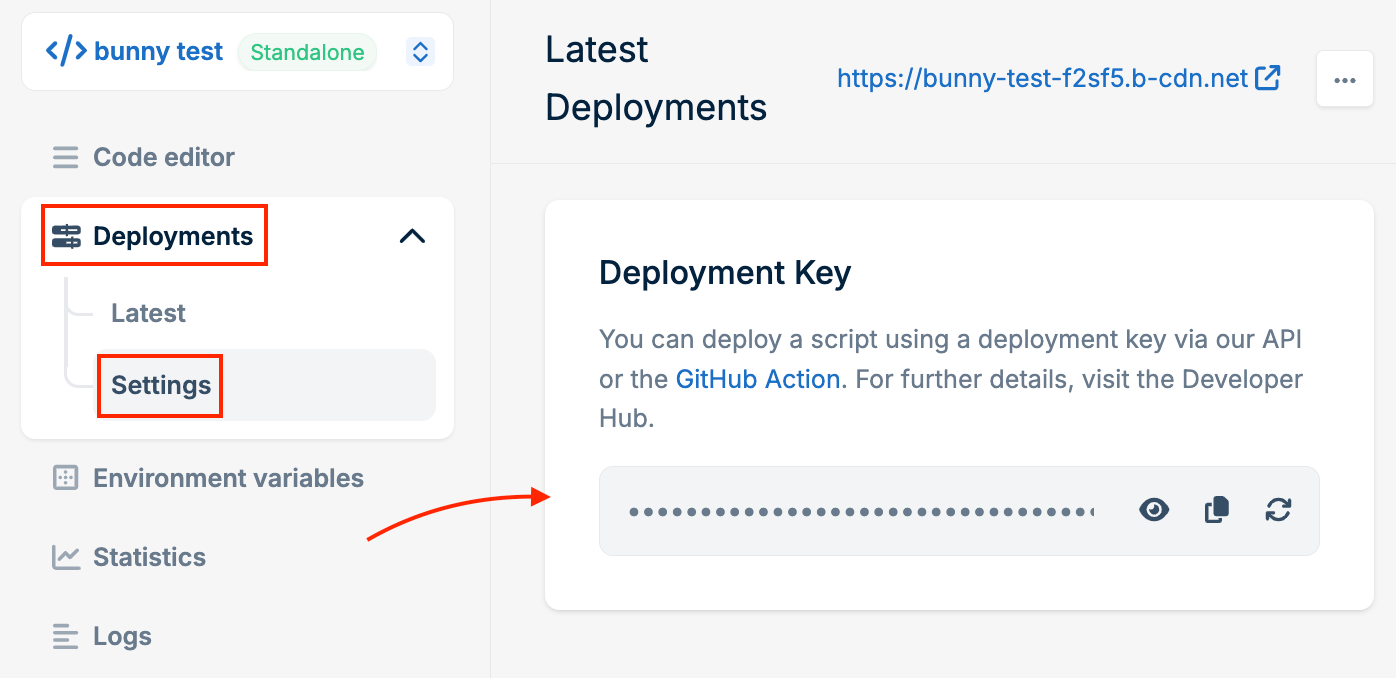
The script ID and deploy key are available in the dashboard under Script -> Deployments -> Settings.Place the workflow file in the .github/workflows folder in your repository, and adjust it to fit your own build and deployment pipeline. The official GitHub documentation covers workflow syntax in full.