
JA4 fingerprinting: a better way to identify clients

Joe Connolly

March 25, 2026
There was a time when identifying traffic on the internet was relatively straightforward.
An IP address and a User-Agent were usually enough to make a decision. If something looked wrong, you blocked it. Otherwise, you let it through.
That approach no longer holds up.
Today, a single automated client can appear as thousands of different users, rotating IPs, mutating headers, and mimicking real browsers with surprising accuracy. Botnets operate at scale across large networks, while headless frameworks and AI-driven agents make it even easier to blend in.
At that point, what a client claims to be is no longer something you can rely on. You need a signal that is much harder to fake.
Looking at what clients can’t easily fake
Every HTTPS connection starts with a TLS handshake. Before any request is sent, the client introduces itself through a
ClientHello
message that reflects its underlying TLS stack, including supported versions, cipher suites, extensions, and protocol preferences.
Unlike headers, which are trivially manipulated, the TLS handshake reflects the client’s underlying implementation and is far harder to replicate.
JA3 was one of the first widely adopted approaches here. It takes values from the TLS handshake and hashes them into a fingerprint, giving you a way to group similar clients together.
For a while, it worked well. However, it relies heavily on the exact ordering of fields in the handshake, which introduces a key limitation.
Modern browsers and privacy-focused clients often shuffle TLS extensions specifically to avoid being tracked. From a functionality point of view, nothing has changed, but to JA3 it looks like a completely different client.
The same browser can produce multiple fingerprints, making it harder to reason about. At the same time, attackers can exploit this by slightly tweaking the ordering or configuration to avoid matching known fingerprints.
JA4 addresses this directly by removing those inconsistencies.
Instead of hashing the raw handshake as-is, it normalizes the data first. It focuses on the parts that actually describe the client and removes noise like ordering differences.
The result is a fingerprint that stays consistent for the same client, even with those small variations, and is much harder to manipulate without actually changing the underlying TLS stack.
A more stable way to fingerprint clients
A JA4 fingerprint is a compact string like this:
At first glance it looks cryptic, but it is not random.
It is made up of multiple parts, each describing a different aspect of the TLS handshake.
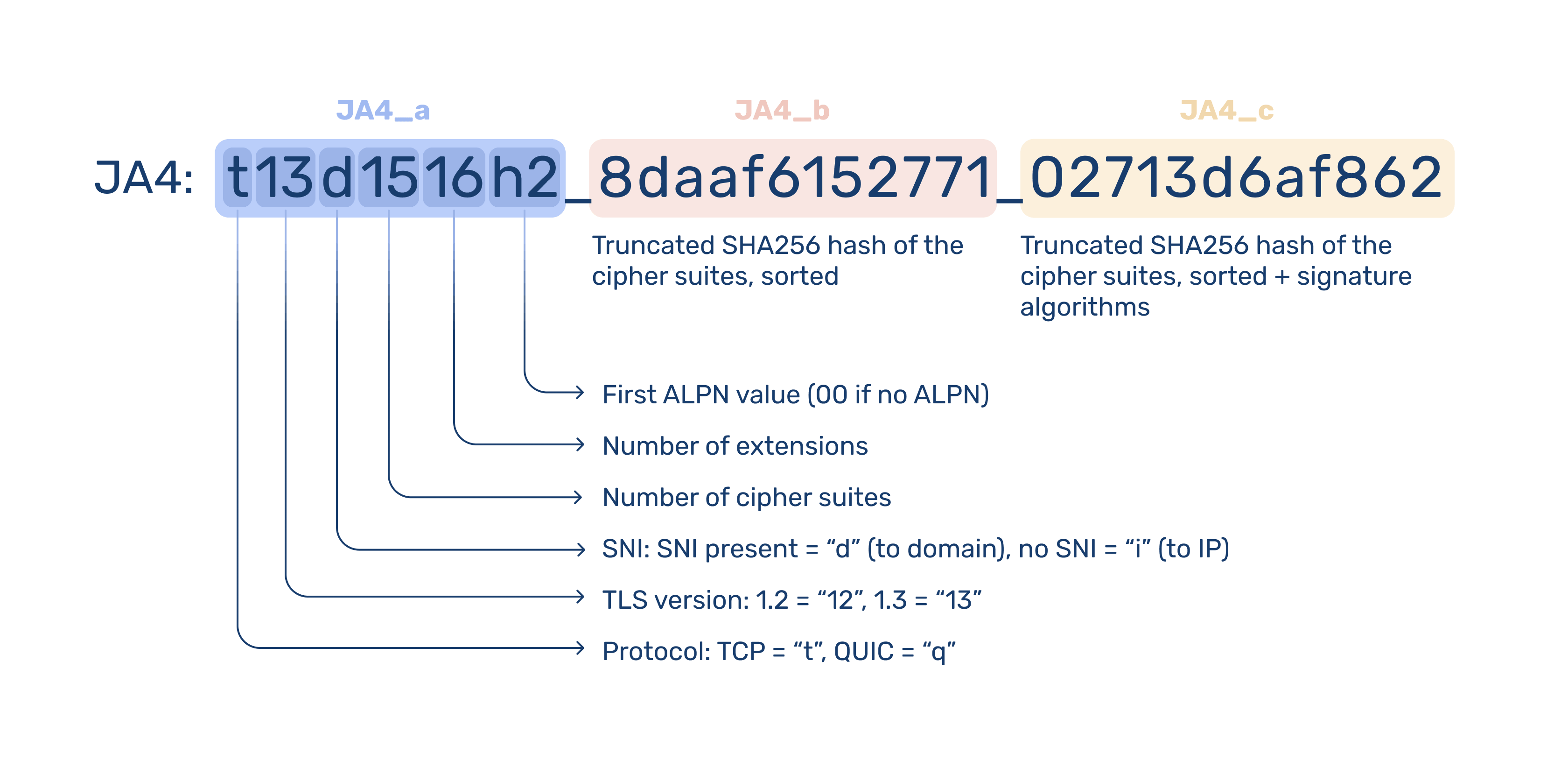
Once you break it down, it becomes much easier to reason about. You are not just looking at a hash; you are looking at a structured summary of how that client speaks TLS.
That structure is what makes it practical.
Instead of treating the fingerprint as a single opaque value, you can match on parts of it, group similar clients together, or spot outliers that do not fit expected patterns.
And because those parts are derived from the client’s actual implementation, they tend to stay stable even when everything around them changes.
JA4 is not meant to uniquely identify individual users. It is a signal that helps group similar clients and works best when combined with other data like IP addresses, request headers, and behavior.
JA4, built into bunny.net
We've incorporated JA4 into our Layer 7 DDoS mitigation and bot detection systems to group related activity and make more accurate decisions without relying on easily spoofed signals.
And since JA4 fingerprinting is now computed automatically for every HTTPS request passing through bunny.net, each request is assigned a fingerprint at the edge and forwarded to your origin via the CDN-JA4 header.
That gives you direct access to the same signal we use internally, with full details available in the JA4 fingerprinting documentation.
Because the fingerprint reflects the client’s actual TLS implementation, it stays consistent even when other identifiers change. That makes it particularly useful for tracking automated traffic that rotates IPs or mutates headers between requests.
For example, traffic coming from hundreds or thousands of different IP addresses may still share the same JA4 fingerprint, letting you group and act on it as a single source.
Putting JA4 to work with Bunny Shield
JA4 is most useful when you can act on it directly.
We have integrated JA4 deeply into Bunny Shield so you can use it to improve your security posture at the edge.
You can create rate limits based on JA4, or combine it with IP addresses for tighter control. You can write custom WAF rules that match a full fingerprint or even specific parts of it. You can also build access lists around known JA4 identities to block, allow, or challenge specific clients.
This is especially useful when dealing with distributed traffic. Even if requests are spread across many IPs, they often still share the same underlying fingerprint. Instead of chasing individual requests, you can act on the source implementation itself.
The end result is simple. You are no longer limited to what a client claims to be. You can make decisions based on how it is actually built.
A better signal for a noisier internet
Relying on IPs and headers is becoming less effective as traffic becomes more distributed and easier to disguise.
JA4 gives you a more stable way to understand what is behind each request. Instead of chasing constantly changing surface-level signals, you can start grouping and acting on traffic based on how it is implemented.
It’s already available on every request passing through bunny.net and fully integrated into Bunny Shield, so you can put it to use immediately.
If you want a clearer view of your traffic or tighter control over how it behaves, this is a good place to start.
Log in to explore JA4, or sign up to get started in minutes.