



Pull from any OCI registry on Magic Containers

Borja Aranda

November 24, 2026
Your images live where your team already pushes them. Until now, Magic Containers was very opinionated and was compatible only with a few well-known registries, so anything else meant mirroring images somewhere we supported.
While this helped stabilize and secure the early experience, we ultimately believe in making our products as accessible as possible and avoiding vendor lock-in.
Now that we've made substantial improvements to Magic Containers over these past months, we're happy to share that this extra mirroring hop is gone: if your registry speaks the OCI Distribution spec, Magic Containers can pull from it.
Any OCI-compliant registry
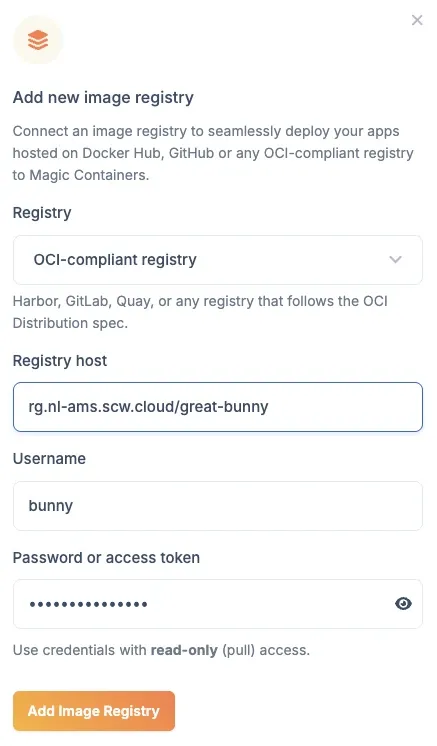
There is a new registry type: OCI-compliant registry
. Give it a host name and credentials, and that is the whole setup. Your team can deploy from Harbor, GitLab, AWS ECR, Azure ACR, Google Artifact Registry, a self-hosted registry:2: if it implements /v2/, it works.
Under the hood, every private registry now goes through one OCI client. It answers the standard WWW-Authenticate token challenge, lists repositories through /v2/_catalog when the registry allows it, and reads tags and digests the same way for everyone. One code path means fewer per-vendor surprises for you, and for us.
We check your credentials when you save the registry. A wrong password fails right there, not at 2 a.m. during a deploy.
Find an image by pasting its reference
Not every registry lets you list its contents. Docker Hub, for example, refuses _catalog. So the container dialog now starts with a single input: paste the full image reference, such as registry.example.com/team/api:1.4.2.

We look it up across your registries and confirm the match: ✓ Found in "my-harbor" · sha256: …

If the tag doesn't exist, you get the closest matches instead of a dead end: other tags of the same image, or images with similar names. Browsing by registry, image, and tag is still there when you want it.
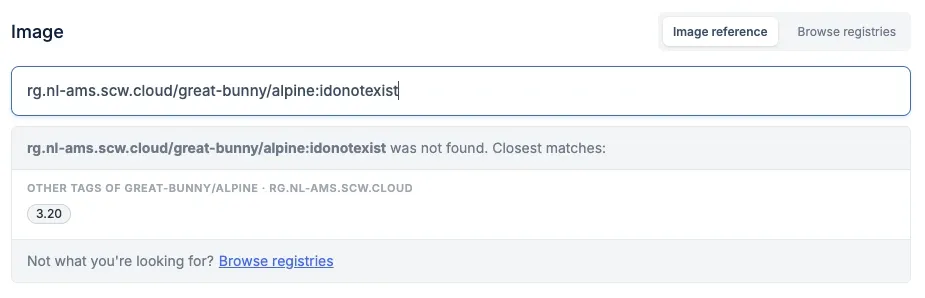
Errors that tell you what broke
"Failed to load images" is not a debugging tool. When a lookup fails now, the panel names the registry that failed and the reason the registry gave: credentials refused, repository not found, host unreachable. With five registries attached, you know which one to fix without opening each of them.
Path-based registries
Some providers hand you an address with a namespace baked in, like rg.fr-par.scw.cloud/my-namespace. Paste it as-is when you add the registry: we keep the host and you reference the namespace in the image name. We also handle Oracle OCIR's token challenge, which sends an empty scope that stricter clients choke on.
Bring your registry
Open the Magic Containers dashboard, add your registry as an OCI-compliant registry with its host name and credentials, and paste your first image reference. We'll check the credentials on save, find the image, and confirm the digest before you deploy.
Spin up your first app globally in minutes, straight from the registry you already use.
Comments require cookies. to view and post.