



Build your own caching rules with pre-cache execution and Cache API in Edge Scripting

Marek Nalikowski

July 28, 2026
Until now, Edge Scripting has had an opinionated default: your code runs after the CDN cache. That's great for efficiency because fully cached traffic never executes your script. But it also means that the moment a response gets cached, your code is out of the loop.
Today, that's becoming a choice instead of a rule. Edge Scripting can now also run before the cache, giving your code control over every single request. And with the new Cache API, your scripts can read, write, and delete entries in a separate cache at the edge.
Let's hop into the details.
Why run before the cache
Running after the cache is a feature, not a bug. When a response is cached, the CDN serves it directly and your script never runs. Cached traffic adds zero script execution, which keeps costs low and latency predictable. For delivery-heavy workloads, that's exactly the behavior you want.
The tradeoff shows up when your workload is dynamic. As soon as a response is cached, you lose per-request control. No auth checks, no personalization, no routing logic; nothing runs until the cache entry expires. The usual workaround is to disable caching for dynamic routes, which solves the problem by throwing away the benefit.
That means you've had to choose between caching and control. Now you can have both.
How pre-cache execution works
Edge Scripts get two new hooks that run on the client side of the cache:
- onClientRequest fires on every incoming request, before the cache lookup. You can modify the request or return a response directly and short-circuit everything behind it.
- onClientResponse fires just before a cache or origin response is sent back to the client. If
onClientRequestreturns a response directly, the request is short-circuited there.
Together with the existing onOriginRequest and onOriginResponse hooks, the request lifecycle now looks like this:
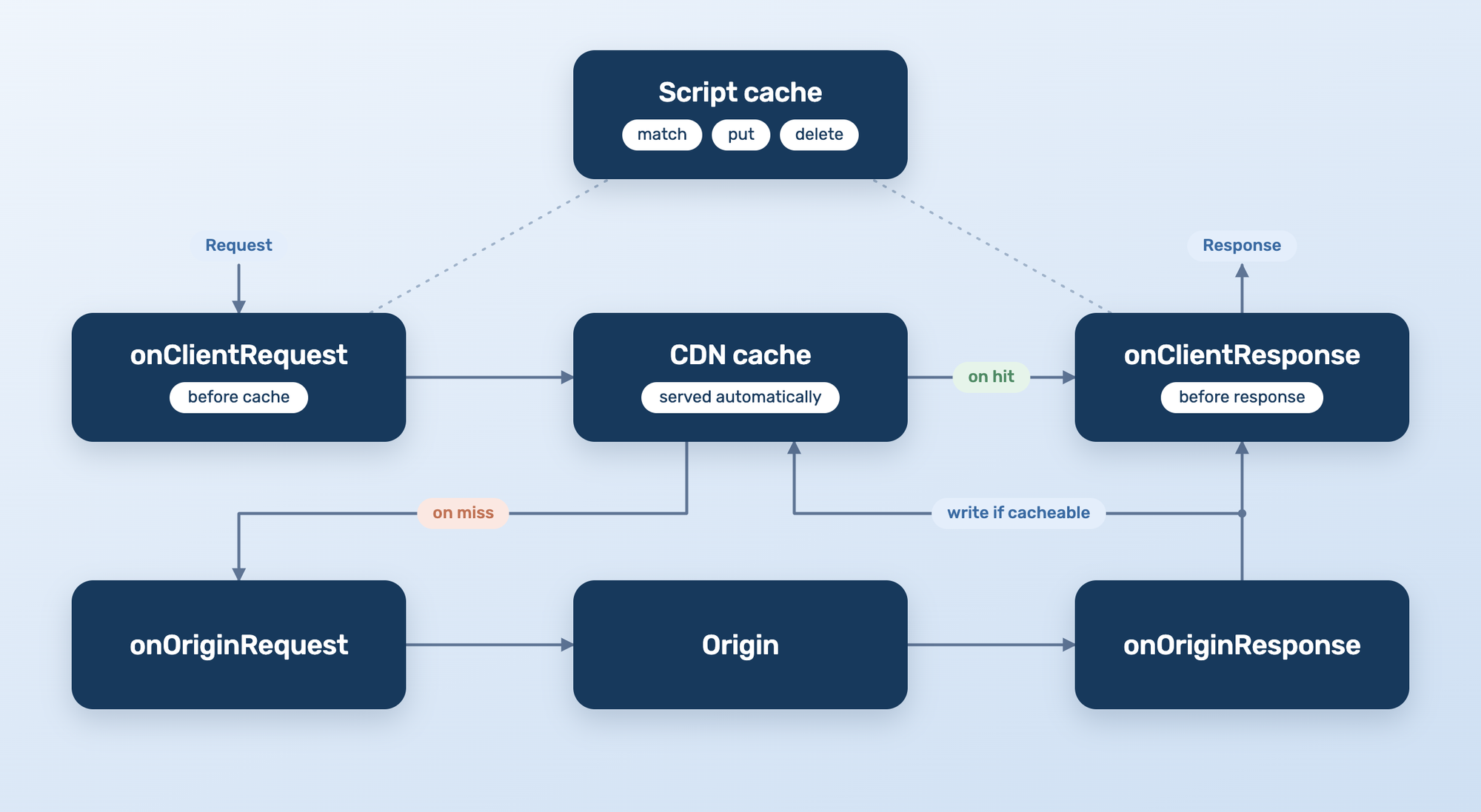
On a hit, the CDN cache answers and your client-side hooks run around it. On a miss, the request continues to the origin hooks and back, writing to the cache on the way if it's cacheable. Either way, your code sits before the cache lookup and just before the response goes out, so you get control around the cache without bypassing it.
Meet the Cache API
Running before the cache is one half of the story. The other half is a cache your script controls directly, separate from the CDN cache that serves requests automatically. That's where the Cache API comes in.
Modeled after the browser’s Cache interface, it lets scripts match, put, and delete request/response pairs. Entry lifetimes follow the Cache-Control headers you set on the responses you write, and expired entries are purged automatically.
Here’s a pattern for taking ownership of a cache entry’s lifecycle: serve a cached value on GET, refresh it on POST, and purge the exact entry on DELETE. The key detail is that all three handlers build the same URL-based key, so reads, writes, and deletes all target the same entry.
import * as BunnySDK from "@bunny.net/edgescript-sdk";

// GET serves the cached entry, POST refreshes it, DELETE purges it.
// (Error handling omitted: match, put, and delete can all throw.)
BunnySDK.net.http.serve(async (request: Request): Promise<Response> => {
  const cache = await caches.open("demo:v1");
  const key = new URL(request.url).toString(); // one key for all three

  if (request.method === "POST") {
    const fresh = Response.json(
      { refreshedAt: new Date().toISOString() },
      { headers: { "Cache-Control": "max-age=60" } },
    );
    await cache.put(key, fresh.clone());
    return new Response("Refreshed.", { headers: { "Cache-Control": "no-cache" } });
  }

  if (request.method === "DELETE") {
    const deleted = await cache.delete(key);
    return new Response(deleted ? "Purged." : "Nothing to purge.", {
      headers: { "Cache-Control": "no-cache" },
    });
  }

  const cached = await cache.match(key);
  return cached ?? new Response("No cached value yet.", {
    status: 404,
    headers: { "Cache-Control": "no-cache" },
  });
});
That same pattern scales up to tenant-aware keys, microcaching, manual refresh hooks, and exact-entry purges. It's a script-controlled cache at the edge, separate from the automatic CDN cache: you decide how entries are created, found, and removed.
A few things to know before you design around it:
- Cache contents are regional. Entries live in the region where they were created and don't replicate globally. A page cached in Frankfurt gets cached again in Singapore on the first request there.
- Cache keys are yours to design. An entry's key is exactly the URL or Request you pass, nothing more. There's no automatic normalization, so
/pageand/page?utm_source=xare two different entries unless your code makes them one. We recommend building keys from the current request URL. That discipline pays off when it’s time to delete an entry: you can only purge it if you can rebuild its exact key. - Pull Zone domains share cache instances. Cache instances are shared across all domains associated with your Pull Zone, but they need to be accessed through the incoming request's hostname. For multi-domain Pull Zones, build keys from the current request host or request URL.
- Limits:
match,put, anddeleteare the supported operations on Cache instances, with a 100 MB limit per cache file.
Pre-cache execution and the Cache API are two separate features, but they're better together. Running before the cache gives you control on every request, and the Cache API is how you put caching back in on your terms.
This unlocks two major use cases:
Multi-tenant delivery on your caching rules
When every hostname, path, or account maps to a different tenant, one-size-fits-all cache rules stop being enough. With scripts in front of the cache, your delivery logic can:
- Key cache entries per tenant, using tenant-aware prefixes inside versioned named caches, with TTLs controlled by the
Cache-Controlheaders on the responses you write. - Invalidate exact entries surgically, as long as your application can reconstruct the keys it wrote. This is exact-key deletion, not wildcard purge or tenant-wide key listing.
- Decorate cache or origin responses per tenant in
onClientResponse, adding headers or security policies without waking up the origin. - Build dynamic caching patterns the CDN doesn't offer out of the box, like microcaching rendered pages or using explicit
POST/DELETEhandlers to refresh and purge known cache entries.
If you run a platform where your customers' content flows through your zones, this lets you turn edge caching from a fixed behavior into part of your product logic.
Serverless CRUD apps at the edge
Until now, a dynamic multi-user app didn't really fit the after-cache model. Sessions, per-user responses, and cache decisions all need code on every request, so you'd end up disabling caching and losing the main benefit of running at the edge.
With pre-cache execution, the pieces fall into place:
- Auth and sessions run in
onClientRequest, on every request - You decide what's cacheable, using the Cache API to cache rendered pages or API responses for seconds or minutes, and serving everything else dynamically
- Compute stays request-based, so a side project that gets no traffic costs nothing in compute, and a production app scales with traffic
- Pair Edge Scripting with Bunny Database for state, so you can build full-stack serverless apps, with read replication to serve reads close to your users
And since both Edge Scripting and Bunny Database are supported by the bunny.net CLI, you (and your agent) can go from local to prod without leaving the terminal.
You choose where your code runs
Post-cache execution stays the default, and it's still the most cost-effective way to run delivery logic: when cached traffic doesn't need script logic, the CDN can serve it directly without invoking your code. Pre-cache execution is the opt-in mode for the routes and Pull Zones where you need per-request control.
Other platforms typically put compute in front of the cache by default, so even cache hits can pass through your code path. With bunny.net you can now choose to keep compute out of the hot path when the cache is enough, or move it in front of the cache when your application needs control.
Getting started
Both pre-cache execution and the Cache API are now available in public preview.
The Cache API works in any Edge Script today. There's nothing to enable. Pre-cache execution is a toggle in the dashboard:
- Middleware scripts: in your Pull Zone, under General → Origin → Run script before cache.
- Standalone scripts: the same toggle in the Pull Zone, or enable it directly in the script's settings.
For more details, check out the docs:
Happy building and let us know what you think on Discord!
Comments require cookies. to view and post.