



Introducing Bunny Sandbox: a disposable room where AI can build

Amir Keshavarz

Marek Nalikowski

July 16, 2026
In 2026, AI agents do not just suggest code. They run it. They install packages, execute shell commands, edit files, clone repos, and reach out across the network, all on their own. That autonomy is the entire point. An agent that has to stop and ask permission before every command is not saving you much time.
But to be useful, an agent needs real access. And nobody is reading every command it runs. Most of the time, that is fine. The agent does exactly what you asked and moves on. The problem is what happens the rest of the time. Every so often an agent deletes the wrong directory, leaks a key it should never have seen, pulls a package that turns out to be malicious, or gets talked into something by a poisoned web page it read halfway through a task.
Here is the pragmatic way to think about it. The odds of any single run going wrong are low. But you are not doing a single run. You are doing hundreds or thousands, and the cost when one goes wrong is not small. It is your laptop, your production credentials, or your customers' data. A low chance of an unbounded loss is still a real, recurring risk. You do not want to bet your environment on it every time.
So people improvise. They run the agent on their own machine and hope for the best. They hand-roll a throwaway VM and wire up the isolation by hand every time. Or they clamp the agent down so tightly it can no longer do the thing they hired it for. None of these is a good answer.
The good answer is old and boring: give the code its own room. Let the agent do whatever it needs in there. If it makes a mess, the mess stops at the walls. A sandbox is a disposable room where AI can do real work, and if it wrecks the place, you throw the room away.
We have been building rooms like this for a long time
Running other people's code, somewhere in the world, quickly and cheaply, is not a new problem for us. It is a problem bunny.net has worked on from the start. Our Magic Containers already deploy your apps across a global network of servers spanning six continents, from Ashburn to Tokyo to São Paulo to Sydney, and they distribute those apps automatically based on where your traffic actually is.
A sandbox, it turns out, is that same capability with two additions: an AI agent already sitting inside, and a room you can throw away when you're done. So we built it.
Meet Bunny Sandbox
Bunny Sandbox uses Magic Containers underneath. In one command, you spin up a fully isolated cloud environment with an AI coding agent like Claude Code already installed, and more agents on the way. The agent does real work inside the box, and you can put that work on the internet just as easily. Same isolation and edge power as Magic Containers, none of the setup.
Every sandbox is a clean Ubuntu container with Node.js, Bun, Python, and Claude Code ready to go, plus a 10 GB persistent workspace so your files survive a restart. You do not manage a server. You do not wire up isolation. You do not clean up afterwards. You get a room, the agent gets to work, and when you are done, the room goes away.
Spin one up from your terminal
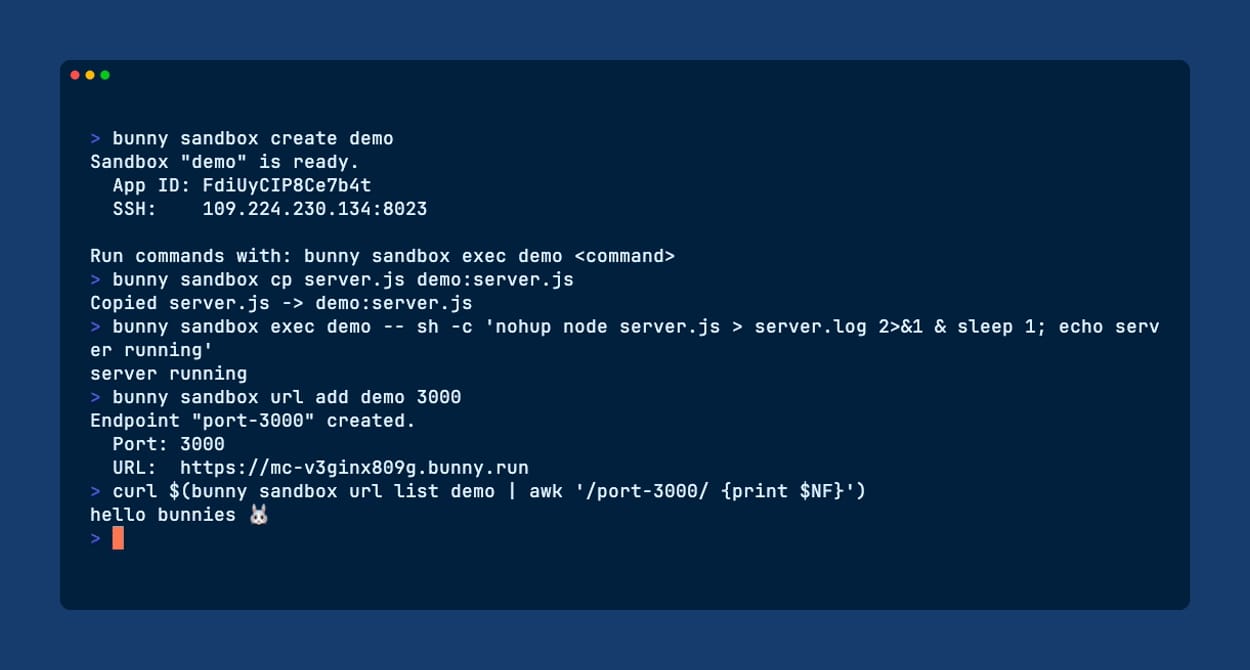
Here is the whole loop, from nothing to a live URL, in the bunny.net CLI.
# Install the CLI
curl -fsSL <https://cli.bunny.net/install.sh> | sh

# Log in
bunny login

# Create an isolated sandbox (Claude Code is already inside)
bunny sandbox create my-sandbox
That gives you a fresh, isolated environment on our edge in seconds. You get back an SSH address and a public hostname that goes live once you expose a port. The CLI remembers your sandboxes locally, so you can reconnect any time without re-creating.
Claude Code needs one thing before it can get to work: your own Anthropic credentials. Either bake your API key in at create time, or just run claude inside the box and log in once. Both stick around across restarts.
# .env holds ANTHROPIC_API_KEY
bunny sandbox create my-sandbox --env-file .env
Now put it to work.
# Drop into the box and let the agent build
bunny sandbox ssh my-sandbox

# Or fire off a one-off command without opening a session
bunny sandbox exec my-sandbox -- npm test
Need to move files? One path is local, the other points at the sandbox:
# Copy a file into the sandbox
bunny sandbox cp ./app.js my-sandbox:/workplace/app.js

# And pull one back out
bunny sandbox cp my-sandbox:/workplace/out.log ./out.log
When the agent builds something worth showing, expose a port as a public HTTPS URL. When you are finished, destroy the whole thing.
# Put the dev server on port 3000 online
bunny sandbox url add my-sandbox 3000

# Done? Throw the room away.
bunny sandbox delete my-sandbox
No control plane to babysit, no separate platform to wire up. When you delete a sandbox, it's gone, and the Magic Containers app underneath goes with it. One thing to keep in mind: a sandbox keeps running, and keeps costing you, until you delete it, so tear down the ones you're finished with.
You can drive it from code too
The same operations (and more) are available as a library. Install @bunny.net/sandbox, and you can create a sandbox, write files into it, run commands, expose a port, and tear it down, all from your own program. That is how you go from spinning up one sandbox by hand to orchestrating many of them: a test matrix, a fleet of agent workers, a sandbox per user.
import { Sandbox } from "@bunny.net/sandbox";

const sandbox = await Sandbox.create({
  apiKey: process.env.BUNNYNET_API_KEY,
  name: "hi-server",
  region: "AMS",
});

await sandbox.writeFiles([
  {
    path: "server.js",
    content: Buffer.from(`
      const http = require("http");
      http.createServer((req, res) => {
        res.writeHead(200, { "Content-Type": "text/plain" });
        res.end("hi");
      }).listen(3000, () => console.log("listening on 3000"));
    `),
  },
]);

// Start the server detached so it runs in the background.
const server = await sandbox.runCommand({
  cmd: "node",
  args: ["server.js"],
  detached: true,
});

// Expose port 3000 as a public CDN URL.
const url = await sandbox.exposePort(3000);
console.log(`Open: ${url}`);

// Kill the server after 60 seconds.
setTimeout(() => server.kill(), 60_000);

// Blocks until the server process exits (via the kill above).
const finished = await server.wait();
console.log(finished.exitCode);

// Tear down the sandbox now that the server is done.
await sandbox.delete();
Isolation you do not have to think about
This is the part that lets you stop babysitting the agent.
Every Bunny Sandbox runs on gVisor. In plain terms, gVisor slips a user-space kernel between the code and the real host. To anything running inside, the sandbox looks and behaves like an ordinary Linux machine. But that code never talks directly to our kernel. It talks to gVisor, which decides what is allowed. This is a real boundary, not a normal container with the lights dimmed.
Every sandbox is walled off from every other one and from the host underneath it. An agent that goes off the rails is trapped in a room it cannot escape. That is the whole promise: the blast radius of a bad command is the sandbox, and only the sandbox.
From idea to public URL without the detour
Because Bunny Sandbox uses Magic Containers and runs on the same global edge, whatever the agent builds can go live on the same network that already serves traffic worldwide. There is no export step, no second platform, no repackaging. One command turns a port inside the box into a real, shareable HTTPS URL. Build it and ship it in the same room.
Pay for the room while you are in it
Sandboxes are disposable by design: spin up, let the agent work, tear down. A sandbox is billed at standard Magic Containers pricing:
- Compute: $0.02 per CPU core per hour, billed per second, up to 8 cores
- Memory: $0.005 per GB per hour, billed in 64 MB increments
- Workspace: $0.10 per GB per month on the allocated 10 GB
- Anycast IP: $2 per month, billed per minute (every sandbox gets one, for SSH and public URLs)
Because it's per-second and per-use, cost tracks what the agent actually does. A couple of active hours of coding work run on the order of cents of compute and memory, plus a little IP time. Heavier workloads cost more, idle ones less. Delete a sandbox and it stops costing you anything.
When you actually need this (and when you do not)
We will be straight with you, because a sandbox is a tool, not a religion.
You probably do not need a sandbox to run code you wrote and trust on your own laptop. Carry on. Sandboxes earn their keep in three situations: when the code is untrusted or agent-generated, when you are running many of these at once, or when you want to hand a running environment to your own users without handing them your infrastructure.
And one honest caveat. Isolation is a boundary, not a force field. It contains what runs inside. It does not turn bad code into good code or a leaked secret back into a safe one. Give each sandbox only the credentials the task genuinely requires. The room keeps the mess in. It is still on you not to put your crown jewels in the room.
We are just getting started
Bunny Sandbox is live today, and this is the first version. Here is what is coming:
- More agents. Claude Code is where we started, not where we stop. We are expanding to more coding agents so you can pick the one that fits the job.
- Deeper integration with the rest of bunny.net, so a sandbox can reach for the services you already use without extra plumbing.
- More code syncing, so moving work between your machine and the box stops being a chore.
- A built-in gateway, so putting your work online no longer means paying for a separate IP address.
- More SDKs. Python and Rust are on the way, so you can drive sandboxes from those languages too.
Tell us what you want to build in a box, and we will help build the box.
Try it
Want to let an agent run without watching every command it types? Give it a room. Create your first Bunny Sandbox in a couple of commands. The docs have the rest.
The CLI is open source, and the code's on GitHub — thanks to everyone who's contributed so far. Come tell us what you're building in Discord.
AI needs a safe place to build. Now it has one on a network built to make the internet hop faster. Happy building!
Comments require cookies. to view and post.