



Introducing the bunny.net CLI

Jamie Barton

May 11, 2026
The best developer tools don't ask you to context-switch. They meet you where you already are.
For most developers, that's the terminal. Not because it's retro or minimal, but because it's the one surface that works everywhere—your local machine, your CI pipeline, your AI coding assistant. The commands you type are the same commands your automation runs. A good CLI isn't just a power-user shortcut. It's the most composable interface a platform can offer.
Today we're releasing the bunny.net CLI, a single command-line tool for building and managing your entire bunny.net stack. This first release ships with full Database support, including the interactive SQL shell we introduced a few weeks ago. Support for Edge Scripting, Storage, Magic Containers, and more is coming soon.
The CLI is currently in public preview, and we’re building it in the open. We’d love your feedback, bug reports, and pull requests as we shape what comes next.
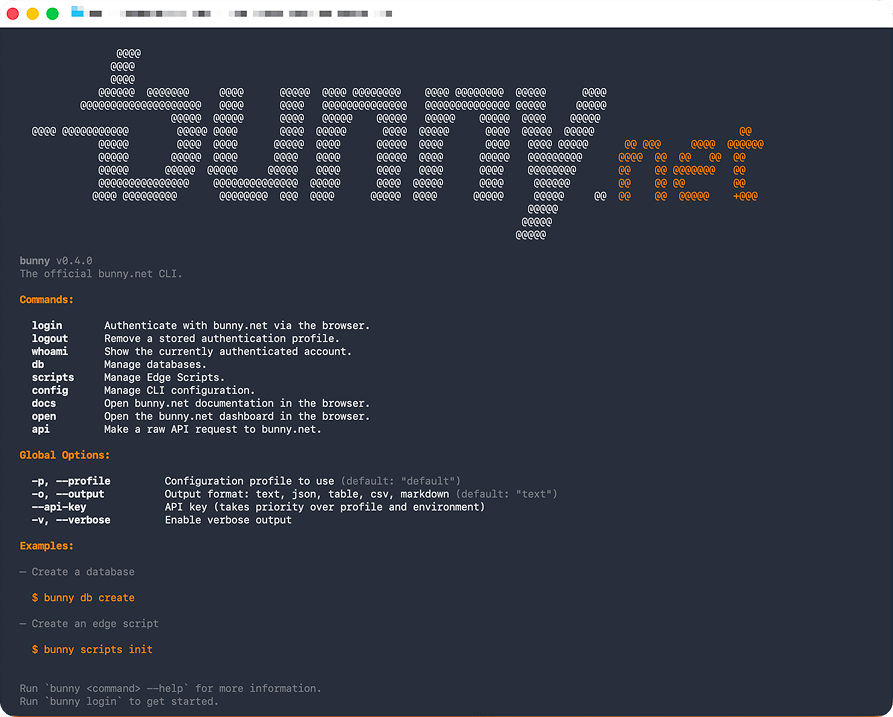
Up and running in three commands
Install with npm:
npm install -g @bunny.net/cli

# or
# curl -fsSL https://cli.bunny.net/install.sh | sh
Log in:
This opens your browser, authenticates with your bunny.net account, and saves a profile locally. Note that it currently fetches your API key from your account once signed in.
Confirm it worked:
bunny whoami
Logged in as Jamie Barton (jamie@bunny.net) 🐇
Database management without the dashboard detour
The usual flow after creating a database is to open a dashboard, hunt for the connection string, copy it, paste it somewhere, hope you got the right one.
The CLI replaces all of that with a few commands.
Create a database
Run bunny db create with no arguments and the CLI walks you through it interactively — name, region, options:
Already know what you want? Pass the flags directly:
Both paths produce the same result. Interactive mode is great for exploring. Flags-first is what you'll reach for in scripts, pipelines, or when your AI assistant is driving.
After creation, the CLI offers to link the database to your current directory, generate an auth token, and write credentials to
.env
so you can go straight from
create
to querying in the same shell session.
Inspect what you just created:
bunny db show

 Key               Value
 ID                db_01KP8D0MKHB7HWEYYE6VX8CTG7
 Name              my-app-db
 URL               libsql://01KP8D0MGVG0PEWR9SCTND02PH-my-app-db.lite.bunnydb.net/
 Status            Active
 Size              4.1 KB / 1024.0 MB  ░░░░░░░░░░░░░░░░░░░░  0%
 Storage Region    eu-west-1
 Primary Region    London (UK)
 Replica Regions   None
Linking a directory to a database
Most db commands need to know which database you're targeting. Passing an ID every time gets old fast, so the CLI resolves the target database automatically in this order:
- An explicit
<database-id>argument - A
.bunny/database.jsonmanifest created bybunny db link BUNNY_DATABASE_URLfrom a.envfile (walked up from the current directory)- An interactive picker if none of the above match
The recommended flow is bunny db link:
link
This writes a small
.bunny/database.json
manifest to your project. Every
db
command run from that directory (
show,
shell,
studio,
usage,
tokens create)
now knows which database to target. No flags, no env var lookups, no connection strings in your shell history.
Add
.bunny/
to your
.gitignore.
The manifest is a per-developer convenience, not something to commit. Each contributor links their own environment.
If you'd rather drive things from
.env
(handy when the same
BUNNY_DATABASE_URL
is already wired into your app), the CLI picks that up automatically. And when you need to run a one-off command against a different database without changing context, pass the ID as an argument:
List, monitor, and clean up
bunny db delete
bunny db usage
Multi-region replication
Bring data closer to your users with read replicas:
bunny db regions
add --replicas UK,NY
bunny db regions remove --replicas NY
Token management
Generate and revoke database tokens without touching the dashboard:
bunny db tokens create --read-only --expiry 30d
bunny db tokens invalidate
Drop into the interactive shell
The CLI embeds the same @bunny.net/database-shell we released as a standalone package, so you get the full interactive experience (dot-commands, saved views, output modes, sensitive column masking) with zero extra setup:
Type .help for commands, .quit to exit.
→ SELECT id, name, email FROM users;
┌────┬───────────┬─────────────────────┐
│ id │ name │ email │
├────┼───────────┼─────────────────────┤
│ 1 │ Alice │ a****e@example.com │
│ 2 │ Bob │ b****b@example.com │
└────┴───────────┴─────────────────────┘
2 rows (4ms)
No connection strings. No token flags. Your authenticated profile handles it. Just
bunny db shell
and you're querying.
Run a one-off query without entering the REPL:
<database-id> "SELECT count(*) FROM orders"
A read-only view with bunny db studio
Sometimes you don't want a REPL. You want to click through tables and see what's actually in there.
bunny db studio
spins up a local server and opens a read-only table viewer in your browser:
It uses the same resolution order as every other
db
command, so if you've run
bunny db link
it picks up the right database automatically. A short-lived auth token is generated for the session and discarded when you close it.
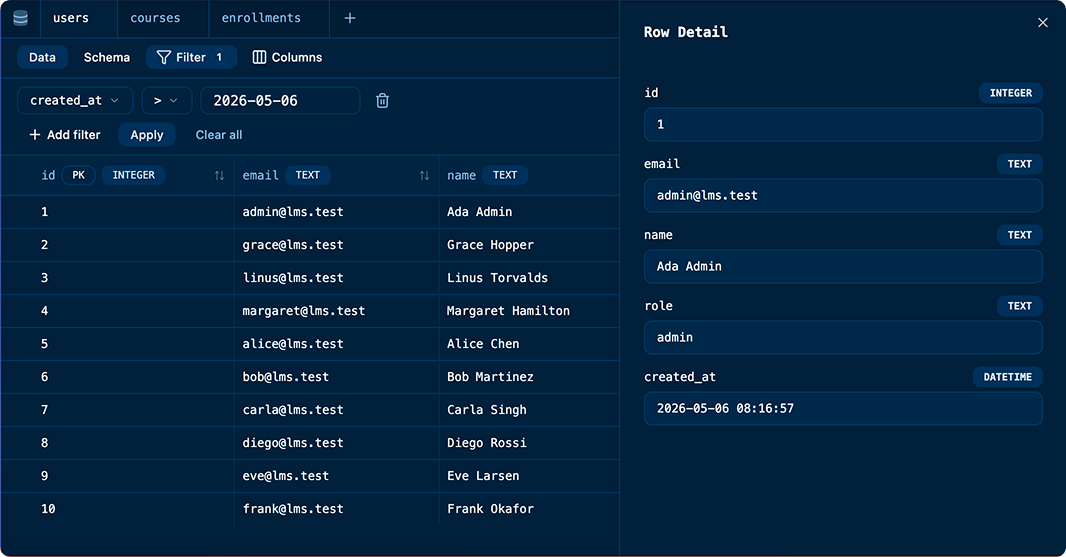
Studio is currently experimental and read-only by design, inspect, don't mutate. For schema changes and data edits, reach for
bunny db shell.
Raw API access with bunny api
Purpose-built commands cover the most common workflows, but sometimes you need to reach an endpoint that doesn’t have a dedicated command yet, or you just want to poke at the API directly. That’s what
bunny api
is for.
It’s a raw, authenticated HTTP client for the entire bunny.net API. Pick a method, pass a path, and go:
bunny api
GET /pullzone
# Grab a specific DNS zone
bunny api
GET /dnszone/12345
# Create a resource with a JSON body
bunny api
POST /videolibrary --body '{"Name":"uploads","ReplicationRegions":["DE","NY"]}'
Every request is automatically authenticated with your current profile, and every response is pretty-printed JSON by default. Pair it with
--output json
and
jq
to build quick one-liners:
GET /pullzone --output json | jq '.[].Name'
You can also pipe request bodies from stdin, which makes it easy to compose with other tools or feed in generated payloads:
| bunny api POST /dnszone
Think of
bunny api
as the escape hatch. If the
bunny.net
API supports it, you can call it from your terminal right now — no wrapper command needed, no dashboard required. It’s especially useful for AI agents that need to access endpoints beyond the built-in commands.
Built like the CLIs you already trust
We followed the
Command Line Interface Guidelines
closely. The conventions that make
git,
docker,
and
kubectl
feel predictable - we wanted
bunny
to feel that way from the start.
Interactive or scriptable - your call. Prompts and spinners are TTY-aware. They show up in your terminal but stay out of the way in CI or when piping output.
Structured output everywhere.
Every command supports
--output json.
Primary output goes to stdout, messages go to stderr, so piping always works cleanly:
--output json | jq '.[].name'
Clear, helpful errors.
Errors are written in plain language with hints on how to fix them. Exit codes are meaningful:
1
for fixable problems,
2
for internal errors. With
--output json,
errors come back as structured JSON too.
Respects your environment.
The CLI honors
NO_COLOR,
supports named profiles for switching between accounts, and reads
BUNNYNET_API_KEY
from your environment when you'd rather skip interactive login:
bunny login --profile work
bunny db list --profile work
Your AI agent already knows how to use it
There's a growing question in the developer tools space: do AI agents need custom protocols, or are the CLI tools developers already use enough?
Increasingly, the answer is that CLIs win.
AI models have been trained on billions of lines of terminal interactions. When an agent reaches for a CLI, it's drawing on deeply learned patterns, not adapting to a bespoke integration. Every bunny CLI command that returns structured JSON is a command an AI agent can already use, with zero extra setup.
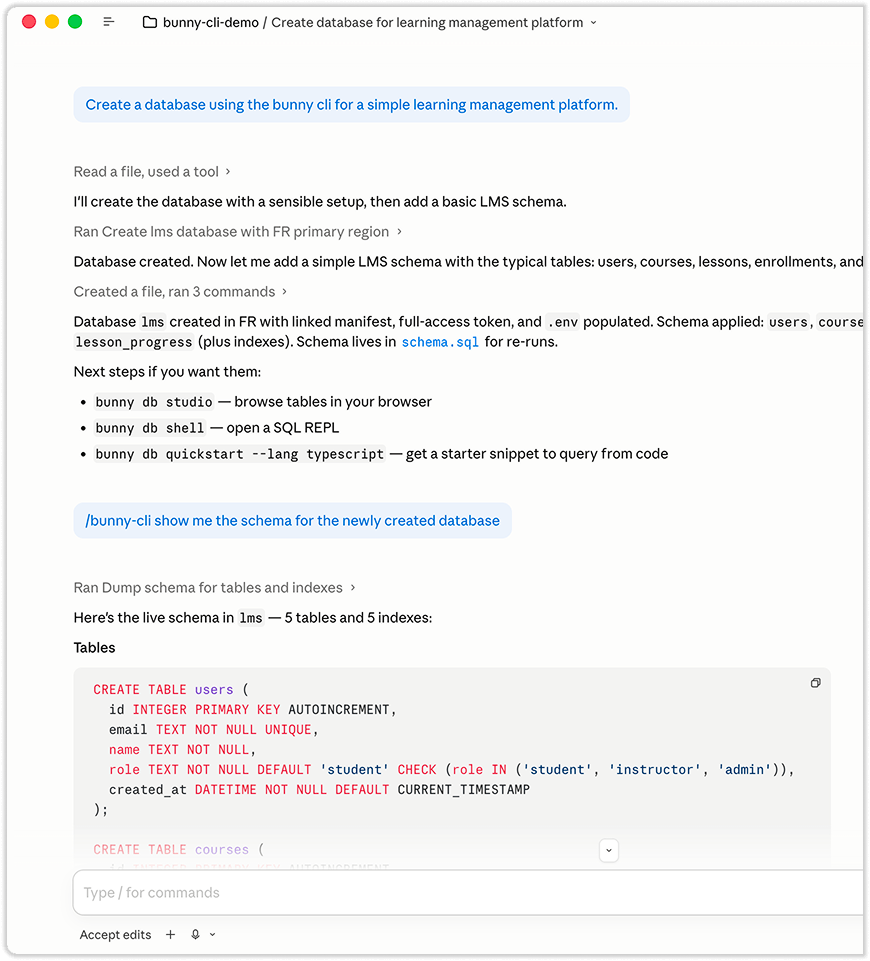
If you're working with Claude Code, Cursor, or Windsurf, your assistant can already create databases, manage tokens, and query data through the bunny CLI, the same way it uses
git
or
npm
today. No MCP server to configure. No schema tokens eating your context window. The CLI you use is the same interface your agent uses.
The CLI comes with agent skills for databases and scripts so your agent knows how to get started. Below we can see Claude Code discovered the tool, skills, and created a database and schema for a new project.
What's coming next
Database support is the starting point. Here's where we're headed.
Edge Scripting
Scaffold a project, deploy serverless functions to the edge, and manage secrets, all from the terminal. Deployment history and rollbacks are on the roadmap too.
Storage
Create buckets, list and sync files, and manage access to S3-compatible storage. The same operations you'd do in the dashboard or with a third-party client, built directly into the CLI with your existing auth.
Magic Containers Apps
If you've ever wanted to go from a
Dockerfile
to a running, globally distributed application in a single command, that's what we’re adding next.
The bigger picture
Our goal is a workflow where you go from an empty directory to a fully deployed application without leaving the terminal. Database provisioned, edge functions live, storage configured, containers scaled. Whether you're typing the commands or your AI assistant is running them, it's the same tool, the same output, the same interface.
Every bunny.net product, one CLI.
Built in the open, built in TypeScript
The bunny CLI is open source, and we’re developing it in public. This isn’t a finished product we’re handing to developers. It’s an active project we want to build with you.
The bunny.net developer platform is JavaScript-native. Edge Scripts run with Deno and Node.js compatibility. The developers building on bunny.net write JavaScript and TypeScript. By keeping the CLI in the same language, we can share code between the CLI and the scripts developers write. Use exports, generated clients, and utilities written for the CLI inside Edge Scripts.
One language for the CLI, the API client, the config schemas, and the edge runtime means fewer switches and a codebase that any JS developer can read, debug, or contribute to.
If something is broken, open an issue. If you want a feature, tell us. If you want to contribute, pull requests are welcome. The CLI is built with TypeScript, Yargs, and a lot of packages that should feel very familiar.
Get started
npm install -g @bunny.net/cli
bunny login
Star the repo on GitHub, join us on Discord, and let’s build this together.
Comments require cookies. to view and post.