


You shouldn't have to rebuild your website: introducing Agent Readability in Bunny Optimizer

Joe Connolly

Marco Biagi

September 24, 2026
In the traffic we analyzed for our 2026 Edge Security Report, AI crawlers were already matching search-engine bots by request volume.
Alongside those crawlers are assistants visiting websites to answer people’s questions. Sometimes, the agentic web is simply someone asking when their tea will ship. The shop has already published its shipping policy, but an assistant receives it wrapped in the HTML for navigation, layout, and everything else that makes the page work in a browser.
At bunny.net, we think making the internet hop faster includes helping these requests do less unnecessary work. An assistant can read HTML; a text-first version can give it the information with less presentation markup to process. We want that improvement to be something you can turn on for the website you already run, without a second publishing project to maintain.
Today, we’re launching Agent Readability in Bunny Optimizer in Public Preview. It automatically converts eligible HTML pages into Markdown and generates an llms.txt guide to help agents find them.
One page, optimized for different audiences
Take the sample About page below, for a tea company called Alder & Vine. Its shipping note survives the conversion intact: orders placed after noon Pacific ship the next business day. So do the headings, numbered list, and staff table. The site navigation and presentation markup are gone.
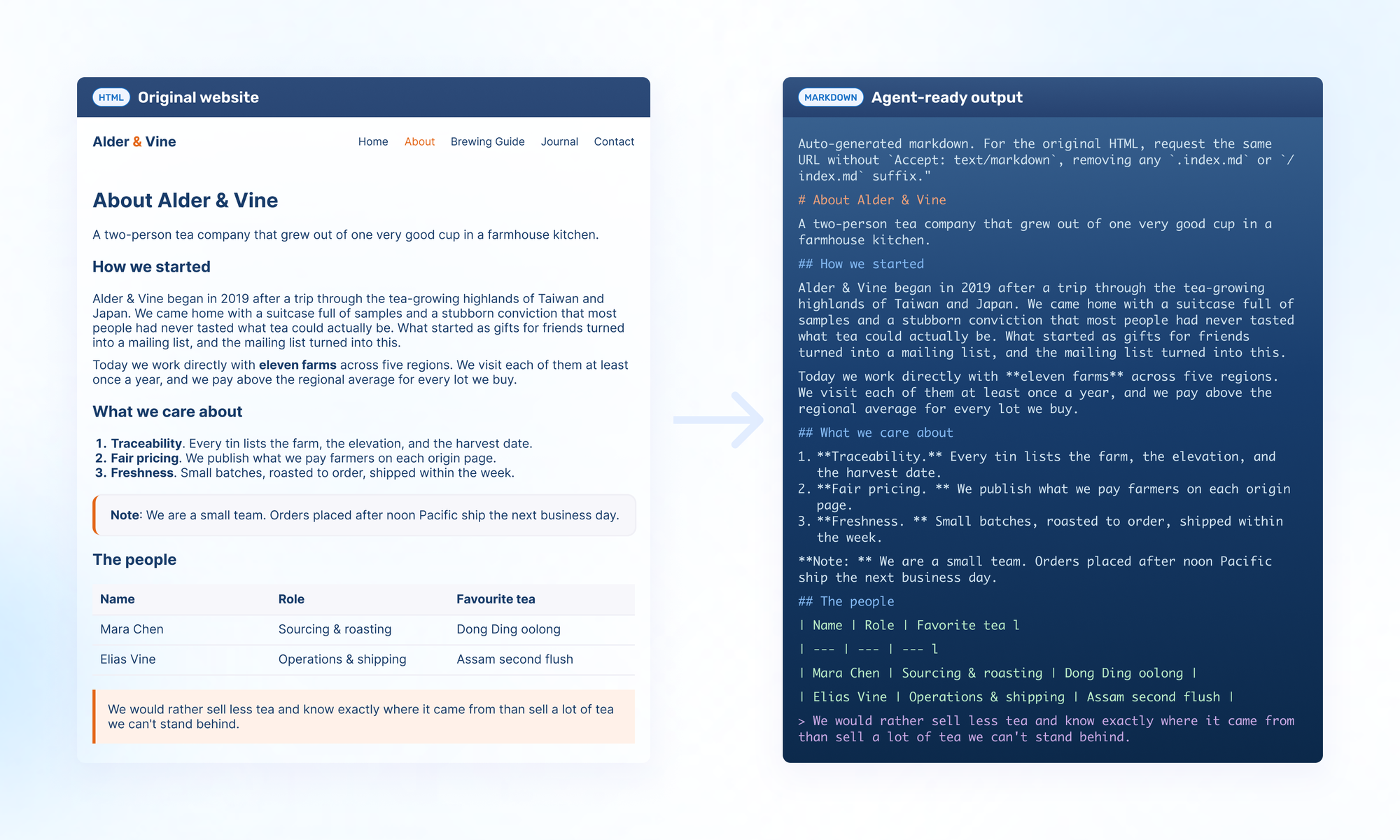
The company’s story comes through, too. You can still read about the trip that inspired it and the farms it works with today. Markdown keeps that context alongside the practical details an assistant might need. A person browsing the site continues to see the original design, while Optimizer creates the text version from the published HTML.
An agent can request the page with Accept: text/markdown or use its Markdown URL directly, for example https://bunny.net/docs/index.md on our documentation site.
Help agents find the right page
An assistant arriving at a documentation homepage still needs to work out where to go next. A setup guide, an account FAQ, and a changelog answer very different questions.
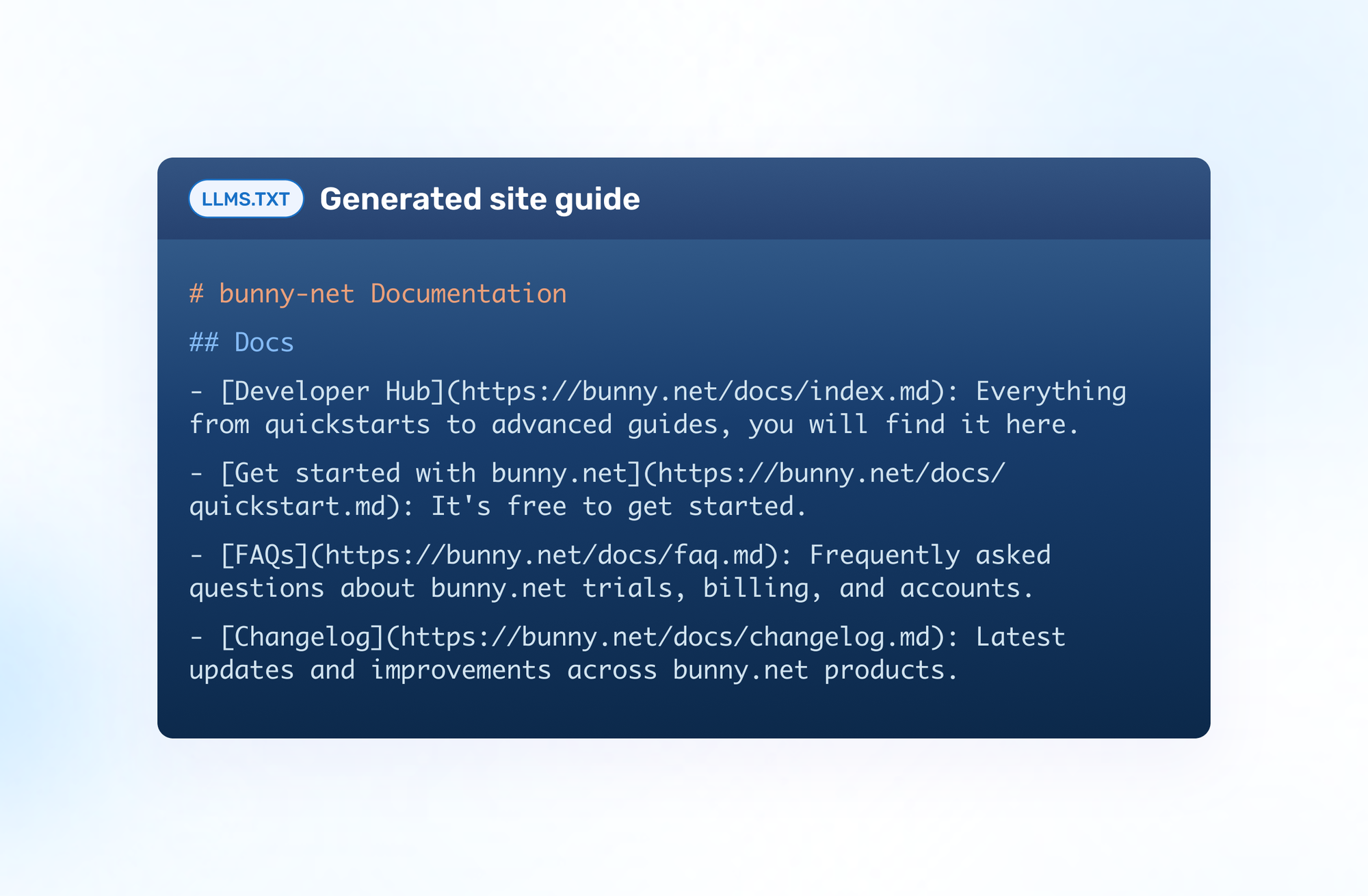
Optimizer also builds llms.txt automatically from the converted pages. Compatible agents can use the descriptions in this file to find relevant pages, then follow the links to retrieve those pages as Markdown.
The bunny.net documentation excerpt below shows how this helps with a specific task. An assistant helping someone get started can follow the quickstart entry, while one looking for recent changes can head to the changelog.
https://bunny.net/docs/llms.txt
Give it a try on your own site
Agent Readability is included with Optimizer at no additional cost. Optimizer is $9.50/month, and Public Preview for Agent Readability is available now.
Open your Pull Zone, go to Optimizer, and enable Agent Readability. Then turn on Markdown and llms.txt for your site.
If you haven’t enabled Optimizer yet, the Optimizer quickstart walks you through initial setup.
Start with a page customers regularly ask you about. Open its Markdown version and compare it with the original, just as we’ve done above. You can see the text an agent can retrieve, then use llms.txt to explore the other converted pages. Whether the question is about setting up a service or shipping a tin of tea, the answer can start with the content you already maintain.
Log in or sign up today and make the content you’ve already published easier for AI agents to find and use.
Comments require cookies. to view and post.